Turn website health signals into alert thresholds
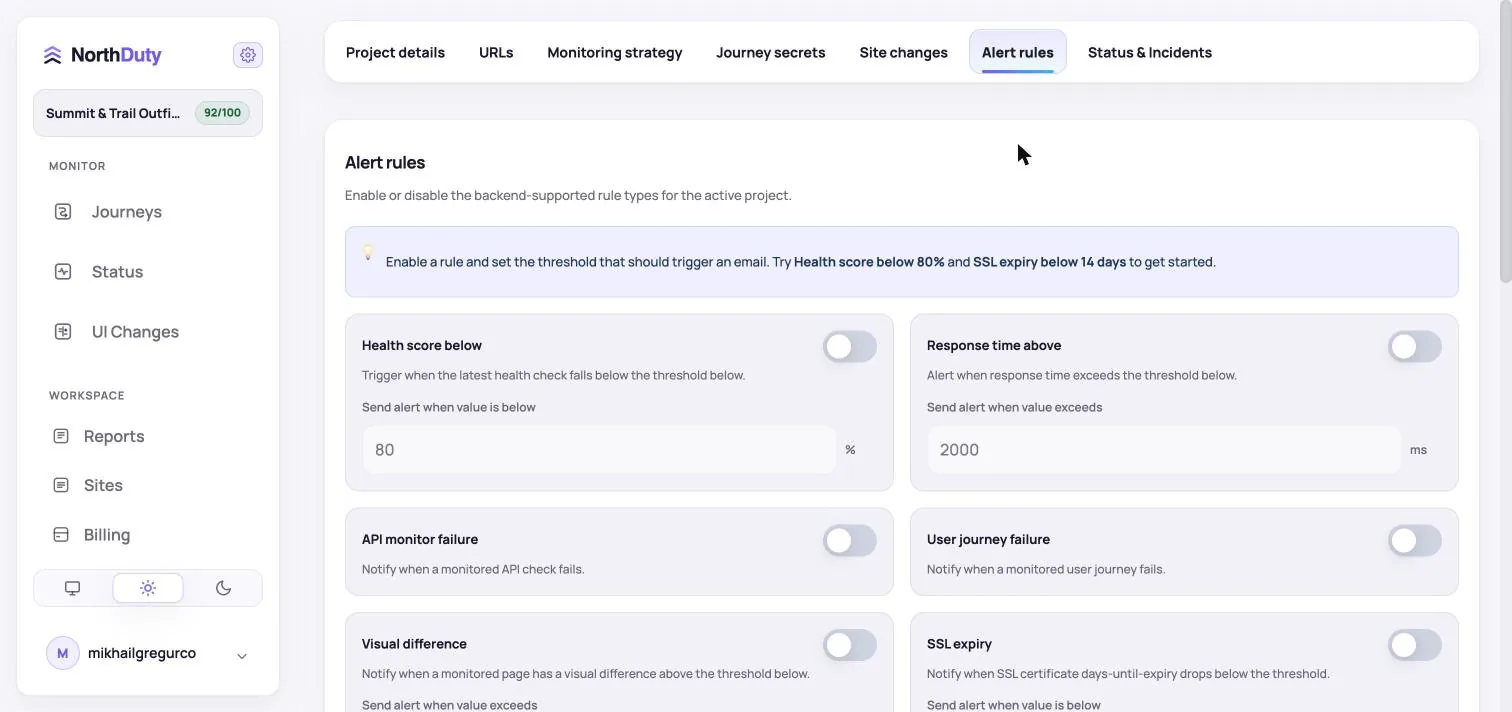
Configure alerts for health score, response time, failed journeys, visual differences, SSL expiry, and other website reliability signals.
Monitoring you can actually trust. Three layers working quietly in the background of every project: website health checks every 5 minutes by default, scheduled screenshot and visual-diff reviews, and AI-suggested user journeys you can review and edit in plain text — always in your control, never a black box. Add your base URL. We'll take it from there.
A website can be technically online while the customer experience is still broken. That is where revenue leaks and support issues begin.
Three monitoring types — uptime, UI changes, user journeys — running together on every project.
Every 5 minutes by default, with 1, 5, and 15 minute cadences available: HTTP status, SSL, DNS, redirects, response timing, Core Web Vitals, blank-page detection, broken resources, JavaScript errors, and first-party API calls — all in one check.
NorthDuty AI suggests 2-5 user journeys for your site. Enable any in one click, or describe your own flow in plain text — no code, no Playwright scripts.
Scheduled screenshots and managed URL screenshot sets, compared pixel-by-pixel against previous baselines so unexpected design or layout changes surface as a diff image.
NorthDuty shows the evidence behind every check: alert thresholds, AI-suggested journeys, visual diffs, and step-level journey results.
Configure alerts for health score, response time, failed journeys, visual differences, SSL expiry, and other website reliability signals.
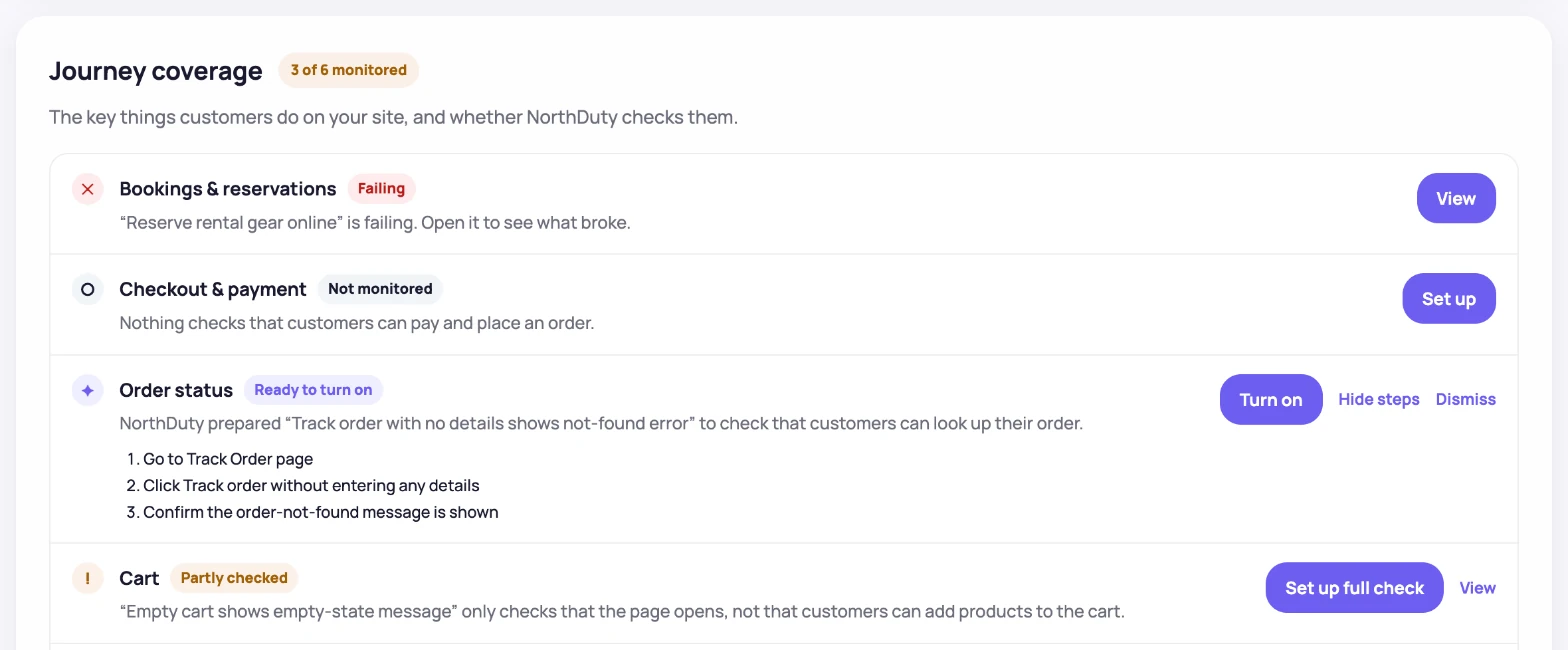
NorthDuty suggests site-specific happy-path flows with concrete steps, so teams can start monitoring important user actions without writing scripts.
NorthDuty compares the latest screenshot against the previous baseline and reports the changed percentage with side-by-side evidence.
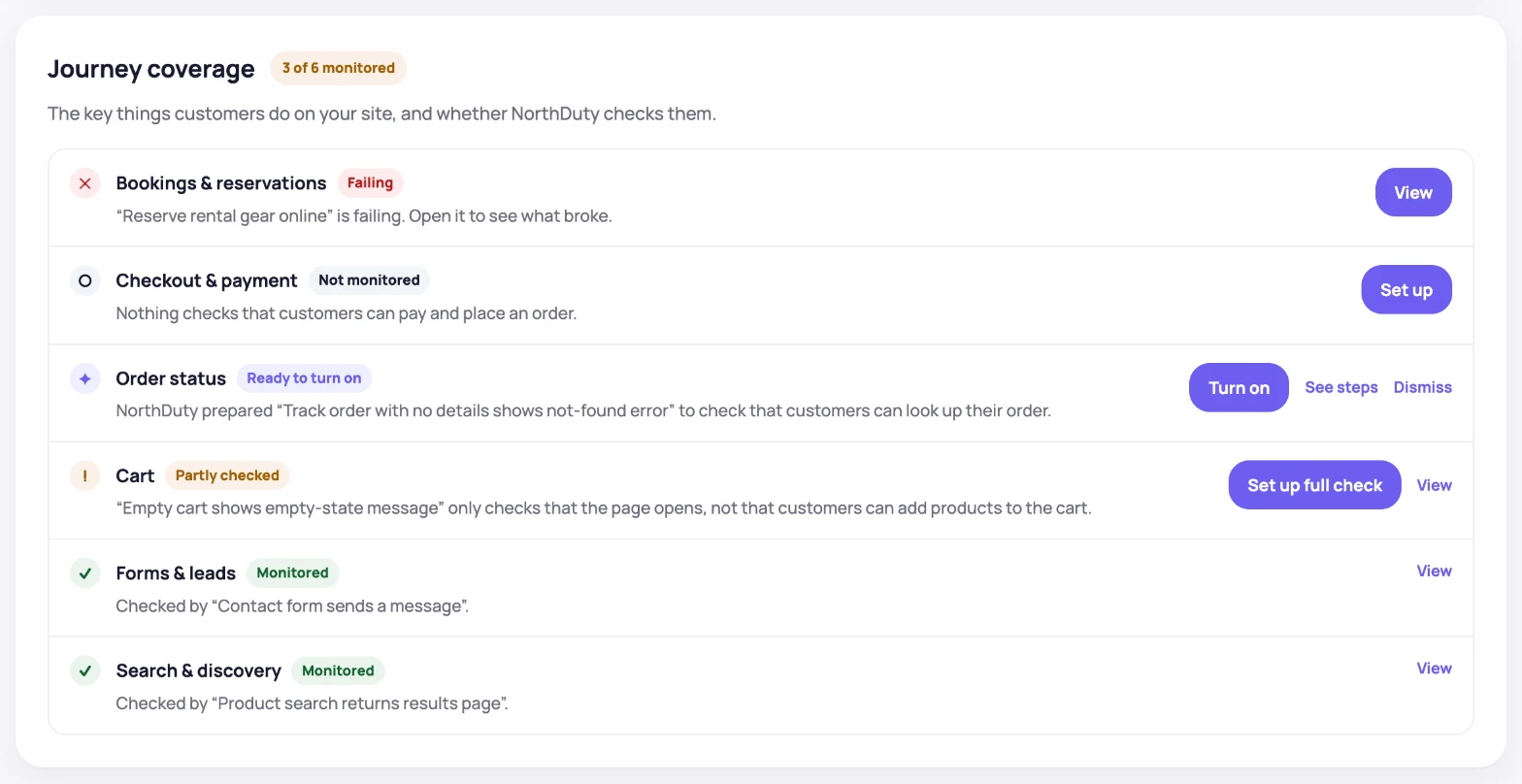
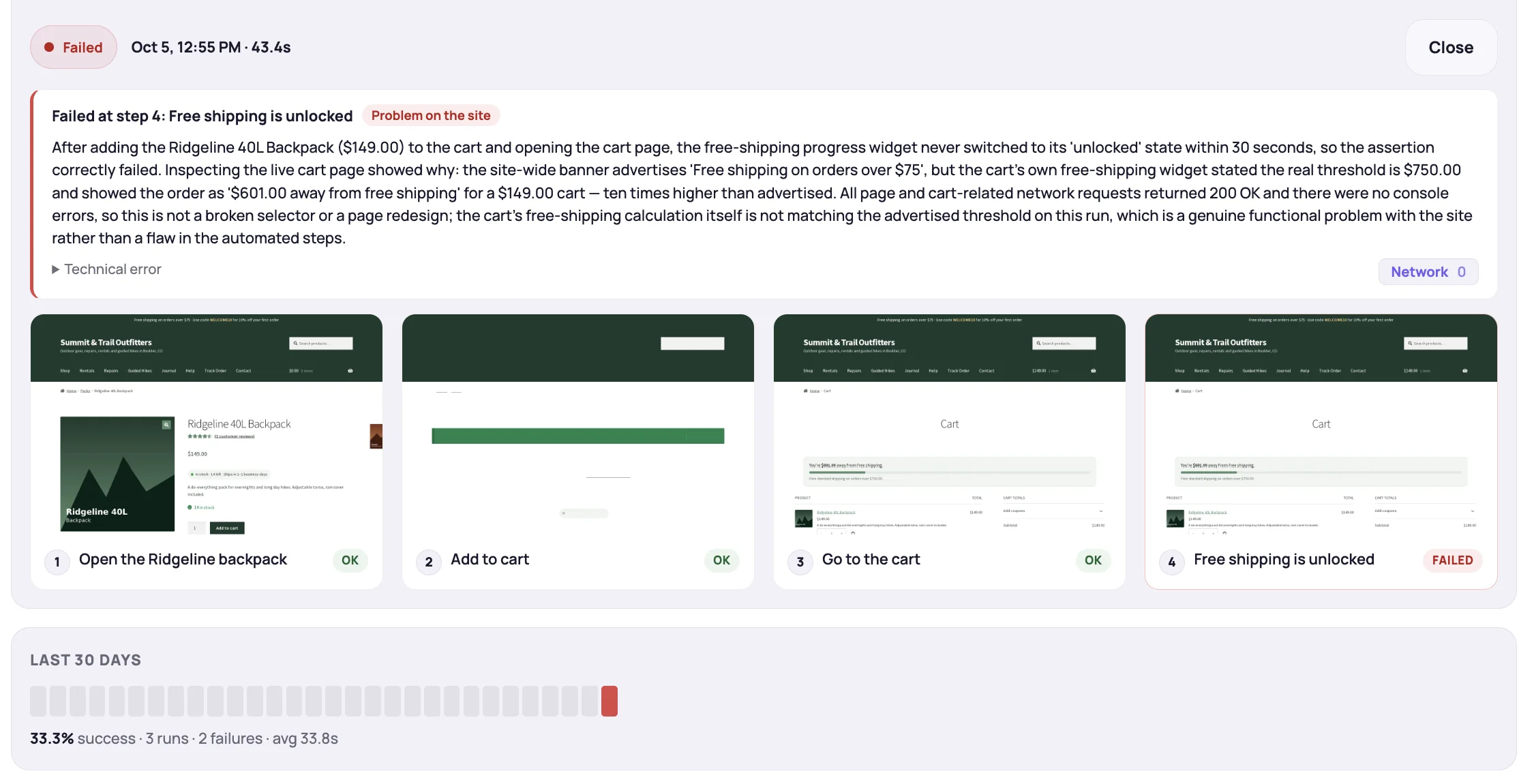
A journey result shows the exact monitored steps, latest run timing, success rate, and current status for a customer-facing flow.
One project, three monitoring types — together they cover availability, visible UI, and the multi-step journeys customers actually rely on.
Confirm your project base URL is reachable and responsive on the default 5-minute cadence, with 1 and 15 minute options in settings.
Catch the trust, performance, and rendering issues that don't show up as classic outages.
Capture the front-end and dependency failures that break customer actions while the page still 'works'.
See exactly what changed visually on scheduled screenshots and managed URL screenshot sets.
Run real multi-step flows automatically — set up in one click or in plain text.
Designed to be easy for technical and non-technical teams.
Add your site's base URL and NorthDuty sets up a project around it — uptime monitoring starts immediately.
Website health runs every 5 minutes by default, screenshots and visual diffs can run daily or weekly, and user journeys use the cadence you choose. Defaults work out of the box; tune anything in project settings.
Each run is timestamped and reported in the dashboard, with diff images, journey transcripts, and full uptime context to help you respond fast.
NorthDuty adapts to the business problems different teams need to protect, from checkout reliability to multi-site oversight.
Protect product pages, cart flows, checkout, and payment-related dependencies.
View ecommerce solutionProtect signup, login, onboarding, billing, and customer-facing application flows.
View SaaS solutionMonitor multiple client websites and catch visible issues before clients do.
View agency solutionGet practical monitoring coverage for launch pages, signup paths, and key growth journeys.
View startup solutionNorthDuty is currently free until Jul 1, 2026. Compare the preview plans from the app billing screen, then review the full pricing page when you need more detail about monitoring depth and scale options.
$0
Current free-period access for teams evaluating NorthDuty before paid plans go live.
$29/mo
For small teams that need core health monitoring and page stability coverage on important routes.
$79/mo
For growing teams that want all three monitoring types: health checks, page stability monitoring, and user journeys.
$199/mo
For teams monitoring more pages and a larger set of business-critical flows.
Most monitoring tools tell you when a server is down. They stay silent when the checkout button disappears, the login form throws a JavaScript error, or a deploy quietly wipes the hero CTA.
We kept watching teams discover broken buttons, blank product pages, and failed signups through angry customer emails instead of their monitoring dashboard. NorthDuty is the tool we wanted: a single check on whether the customer experience still works — not just whether the server replies.
Built for teams whose revenue depends on their website
Use supporting content and product pages to strengthen SEO coverage and help visitors keep exploring after the homepage.
Feature
Learn how NorthDuty combines default 5-minute website health checks, screenshot-based UI diffs, and editable user journey monitoring in one project.
Explore Website MonitoringFeature
Monitor uptime every 5 minutes by default with HTTP, SSL, DNS, blank-page detection, broken resources, JavaScript errors, and API call tracking.
Explore Uptime MonitoringFeature
Get screenshot-based pixel diffs for key website pages so unexpected design, content, and layout changes are easier to review.
Explore UI Changes MonitoringFeature
NorthDuty AI suggests 2-5 website journeys. Enable them in one click or describe a custom multi-step flow in plain text.
Explore User Journey MonitoringHub
Explore NorthDuty features for website health checks, screenshot-based UI change detection, and AI-suggested user journey monitoring.
Browse FeaturesPricing
Explore NorthDuty pricing for website monitoring covering uptime checks, UI change detection, and user journey monitoring.
Compare pricing plansHub
Explore NorthDuty solutions for ecommerce website monitoring, SaaS website monitoring, agency website monitoring, and startup website monitoring.
Browse SolutionsArticle
Learn how to monitor website uptime, choose the right checks, and catch downtime before it hurts traffic, leads, or sales.
Read How to Monitor Website UptimeComparison
Looking for a UptimeRobot alternative? Compare NorthDuty vs UptimeRobot for deeper website health monitoring and user journey visibility.
Compare UptimeRobotComparison
Looking for a Pingdom alternative? Compare NorthDuty vs Pingdom for website health monitoring and business-critical page monitoring.
Compare PingdomComparison
Looking for a Datadog alternative? Compare NorthDuty vs Datadog for focused website health monitoring and simpler website reliability workflows.
Compare DatadogComparison
Looking for a Checkly alternative? Compare NorthDuty vs Checkly for business-friendly website health monitoring and customer-journey visibility.
Compare ChecklyAnswers to common questions about NorthDuty and website monitoring.
Website monitoring is the practice of checking whether important pages, visuals, and user journeys are available, usable, and unchanged for visitors. NorthDuty covers all three from a single project.
Because a website can be online while key customer actions are still broken. Missing buttons, failed logins, checkout problems, and JavaScript errors all happen without a full outage.
Website health checks every 5 minutes by default return HTTP, SSL, DNS, blank-page detection, broken resources, JavaScript errors, and first-party API call results. UI change monitoring uses screenshots and pixel diffs. User journeys run AI-suggested or plain-text multi-step flows on a schedule.
Website health runs every 5 minutes by default and can be set to 1, 5, or 15 minutes. Screenshots and visual diffs support daily or weekly schedules. User journey cadence is configurable per project.
Use NorthDuty to monitor uptime, UI changes, and user journeys from one project — health checks start when you add your base URL, with visual reviews and journeys ready to configure.