NorthDuty Monitoring Features

Start with health checks, one daily journey and plugin-triggered re-checks on Free. The Pro trial and paid plans add more sites, more frequent journeys, automatic deploy detection and every alert channel, within each plan’s limits.

Start your 7-day trial — no credit card, free plan after.

User journeys and website health — one project, one base URL.

Start with the coverage gap, not another blank monitor form

NorthDuty maps the customer capabilities it found, shows what is already protected, and prioritizes the next journey worth enabling.

Journey Coverage

See what customers can do on your site, and what nothing checks yet

Journey coverage lists the key things customers do on the site, such as checkout, cart, search, bookings, and forms, with a plain status for each: monitored, failing, partly checked, ready to turn on, or not monitored. Every row has the one button that fixes it.
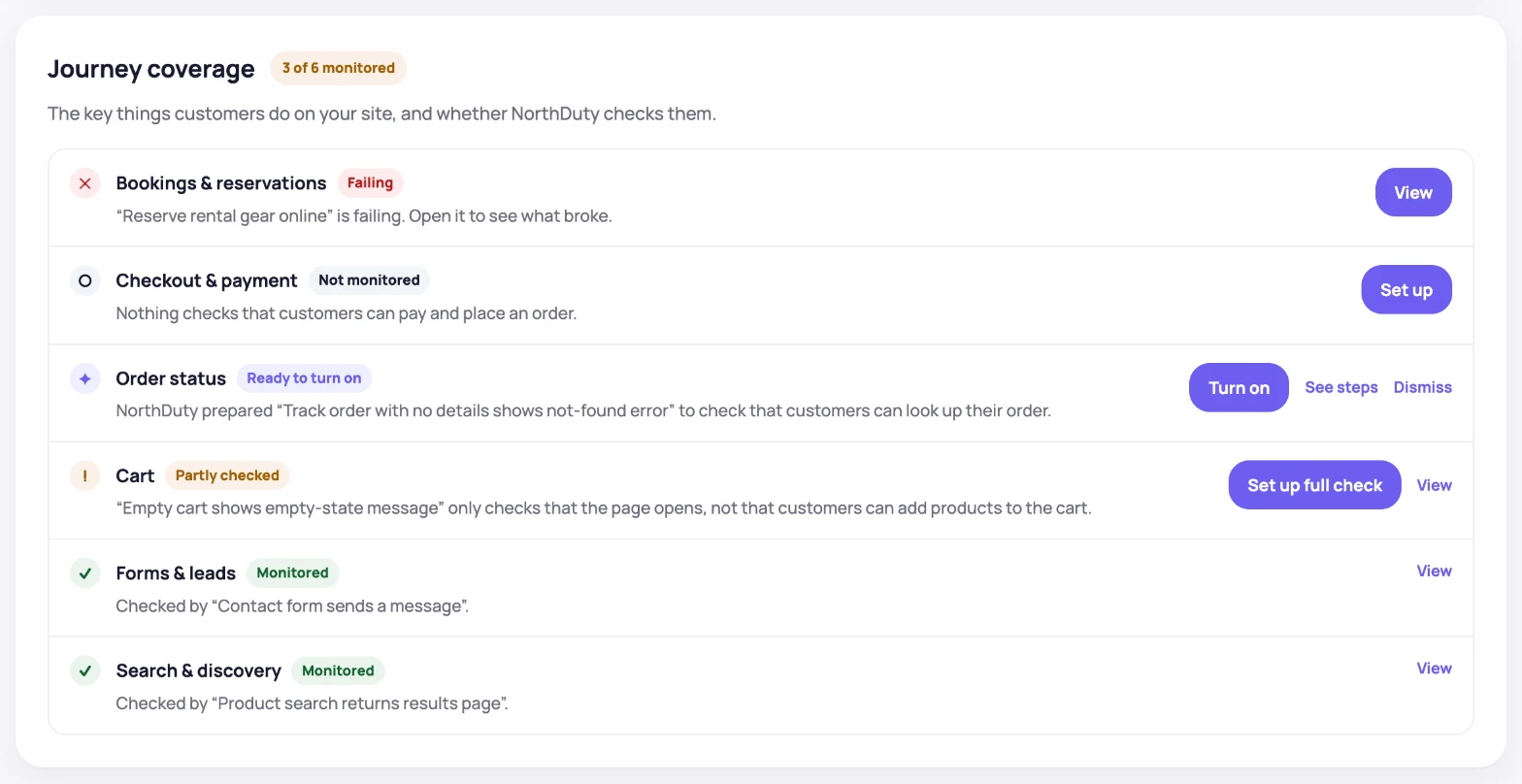
NorthDuty Journey coverage checklist for a WooCommerce demo store: bookings failing, checkout not monitored, an order-status journey ready to turn on, cart partly checked, and forms and search monitored.
One row per customer action, with the thing to fix first at the top.
User Journeys

User journeys

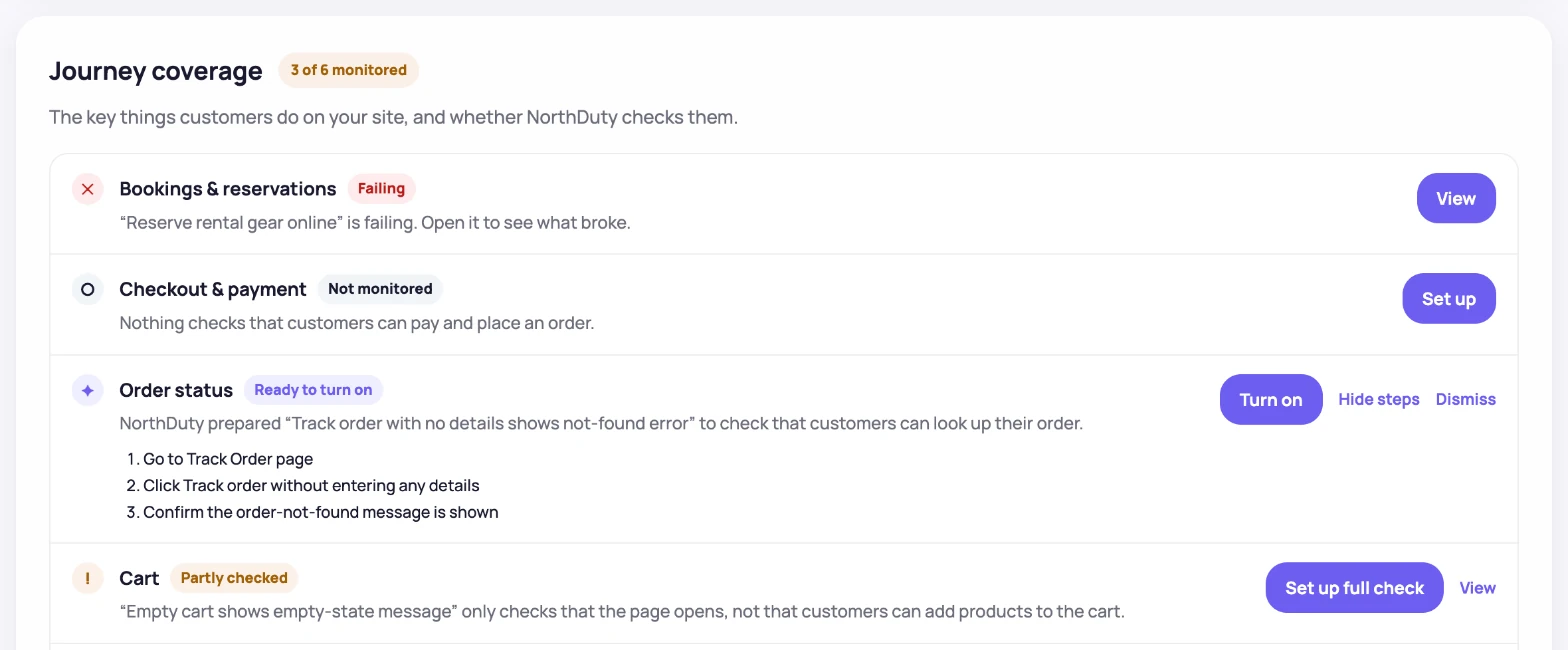
Coverage-aware AI suggests checkout, signup, login, search, cart, navigation, and error-handling journeys. Turn one on in a click, or describe your own multi-step flow in plain text.

NorthDuty Journey coverage with an AI-suggested order-status journey ready to turn on and its three steps expanded, next to a failing booking journey, an unmonitored checkout, and a partly checked cart.
AI suggestions appear in the row they cover, with their steps, ready to turn on.
Uptime & Health

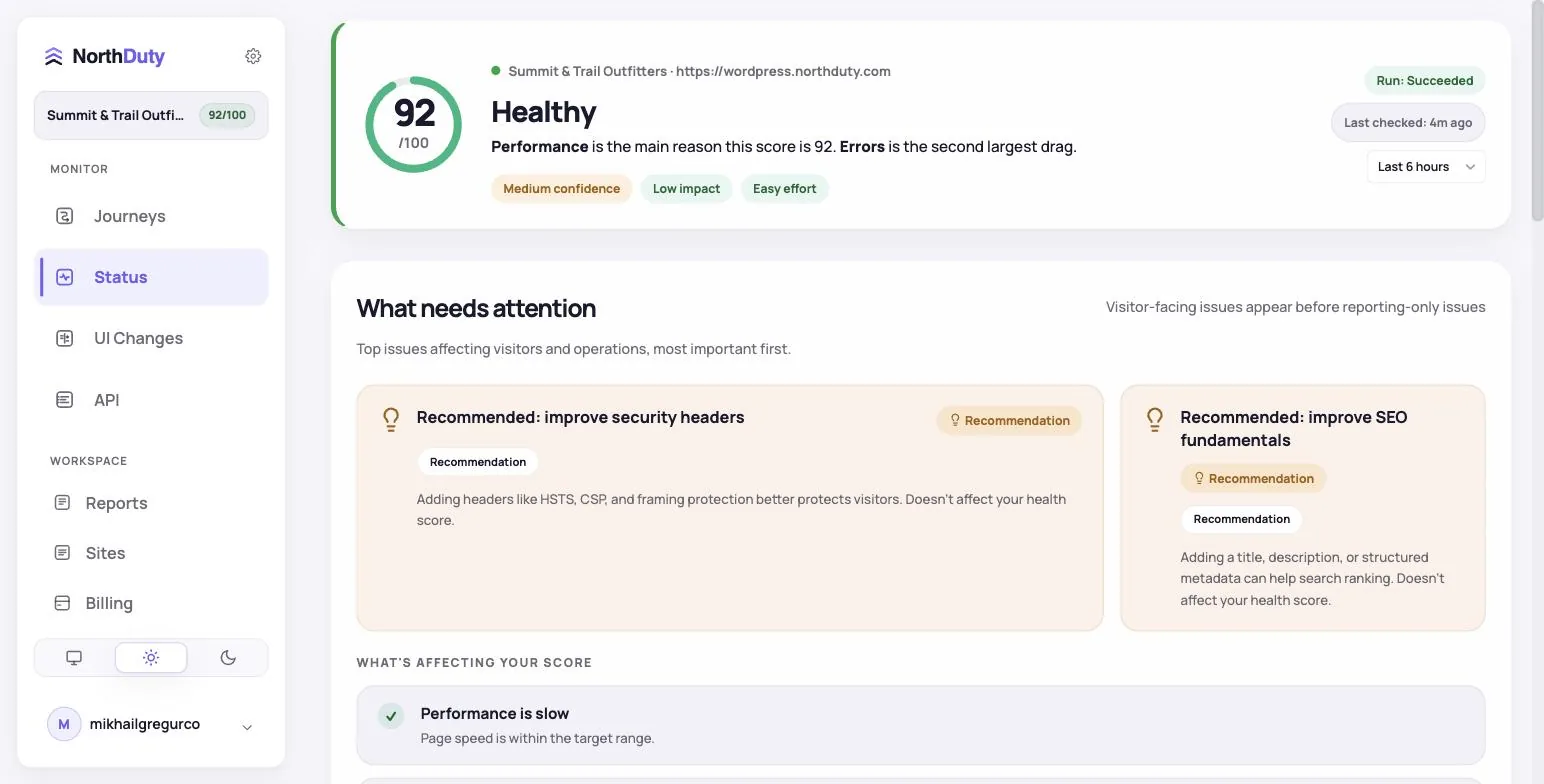
Uptime & website health

Every 5 minutes by default: HTTP status, SSL, DNS, redirects, response timing, blank-page detection, broken resources, JavaScript errors, security header scoring, WCAG accessibility auditing, SEO fundamentals, and domain expiry — all in one check.

NorthDuty website health summary showing health score, response time, SSL, DNS, and other check results for a monitored site.
One health check covering status, SSL, DNS, performance, security, accessibility, SEO, and domain expiry.

One operating layer across every site

The workspace now connects setup, monitoring state, findings, deploys, and incidents instead of leaving each signal in a separate screen.

Workspace overview

Prioritize sites by health, failing journeys, open incidents, recent deploys, and the next action from a single cross-site view.

Monitoring-state guidance

Waiting for first check, checking now, paused, degraded, and ready states explain what is happening and what the user can do next.

Journey coverage

Every customer action gets a plain status: monitored, failing, partly checked, ready to turn on, or not monitored. AI suggestions sit in the row they would cover.

Incident handoff

Turn a detected health finding into an incident with the relevant title, severity, source, and summary carried into the workflow.

Journeys and health — one project, one base URL

Most teams do not just need to know whether a page answered. They need to know whether a customer can sign in, fill out a form, add to cart, complete checkout, or reach a key landing page without friction.

NorthDuty runs those journeys in a real browser on a schedule and tells you which step failed, with a screenshot. Underneath, website health checks every 5 minutes cover everything an uptime tool would, so you don't need a second tool.

Why these features matter

Journeys catch what a status code can't; health checks catch the rest.

How to use the feature set

Set up takes a few minutes — most teams cover their highest-risk flows first.

1

Create a project with your base URL

Uptime monitoring is on by default, and NorthDuty starts drafting journey suggestions for your site.

2

Pick the AI-suggested user journeys you want

Review the journeys NorthDuty proposes for uncovered capabilities. Enable the relevant ones, ask for more, or describe your own in plain text.

3

Set where alerts go

Failed journeys alert by email on every plan; paid plans add Slack, SMS, webhooks and more.

4

Tune cadence per project

Website health runs every 5 minutes by default; journey cadences can be adjusted in project settings.

Feature Pages

Visit each feature page for use cases, benefits, FAQs, and related solution pages.

Feature

User Journey Monitoring

NorthDuty runs your checkout, signup, login and form flows in a real browser on a schedule and reports the exact step that failed, with a screenshot.

Explore User Journey Monitoring

Feature

Signup Flow Monitoring

Monitor signup flows with NorthDuty user journeys so broken forms, missing CTAs, JavaScript errors, API failures, and onboarding issues are caught early.

Explore Signup Flow Monitoring

Feature

Login Monitoring

Monitor login flows with NorthDuty user journeys so authentication pages, forms, JavaScript, APIs, and account-access steps keep working.

Explore Login Monitoring

Feature

Form Monitoring

Checkout form monitoring that submits a real test entry on a schedule and alerts you when it fails. Free plan includes 1 daily form check; paid from $29/mo.

Explore Form Monitoring

Feature

WooCommerce Monitoring

WooCommerce monitoring that runs your real checkout in a browser on a schedule: catch broken carts, failed payment steps and plugin-update fallout early.

Explore WooCommerce Monitoring

Feature

WordPress Monitoring

WordPress monitoring for client rosters: real-browser journey checks and uptime that catch what plugin and theme updates break.

Explore WordPress Monitoring

Feature

Drupal Monitoring

Drupal monitoring that checks the flows, not just the server: Webform submissions, logins and site search run in a real browser, re-run after every security release and deploy.

Explore Drupal Monitoring

Feature

Website Monitoring

Learn how NorthDuty combines editable user journeys and website health checks in one website monitoring project.

Explore Website Monitoring

Feature

Uptime Monitoring

Monitor uptime every 5 minutes by default with HTTP, SSL, DNS, blank-page detection, broken resources, JavaScript errors, and API call tracking.

Explore Uptime Monitoring

Feature

Deployment Monitoring

Automatically run health checks and user journeys the moment your site is deployed or your CMS publishes a change.

Explore Deployment Monitoring

Feature

SSL Certificate Monitoring

Monitor SSL certificates with NorthDuty website health checks so validity, trust, and expiry issues are visible before visitors are blocked.

Explore SSL Certificate Monitoring

Feature

DNS Monitoring

Monitor DNS resolution with NorthDuty as part of website health checks, so domain and resolution issues are visible before important pages become unreachable.

Explore DNS Monitoring

Feature

Website Performance Monitoring

Monitor website performance signals, response timing, and rendering context on the pages and journeys that affect revenue, leads, and trust.

Explore Website Performance Monitoring

Feature

Alerting

Send NorthDuty alerts to email, Slack, Teams, Discord, Google Chat, webhooks, Telegram, WhatsApp, and SMS.

Explore Alerting

Feature

Status Pages

Publish a public status page, open detected findings as incidents, track alert-driven incidents automatically, and schedule maintenance windows.

Explore Status Pages

Frequently Asked Questions

Answers to common questions about NorthDuty and website monitoring.

What monitoring does NorthDuty include?

Two layers: user journeys (AI-suggested in one click or written in plain text, run in a real browser with step screenshots) and uptime and website health (one check every 5 minutes by default). Every project also gets a public status page, incident management, and maintenance windows.

What should an ecommerce store monitor?

The journeys that make money: add to cart, checkout up to the payment page, account login, and contact or quote forms. Health checks underneath catch outages, SSL problems and broken resources.

What should a SaaS team monitor?

Signup, login and onboarding journeys, plus uptime and health checks on the marketing site and the app's entry points.

Start monitoring your website with NorthDuty today.

Get website health monitoring started as soon as you add your base URL, then switch on the journeys NorthDuty suggests in the same project.

7 days with Pro features and limits, no credit card — then keep one daily journey on the free plan.