Direct email notifications for teams that want alerts in the inbox.
Alert Integrations & Notification Channels
NorthDuty turns monitoring signals into alerts and delivers them where your team already works. You can route alerts to nine channel types — email, Slack, Microsoft Teams, Discord, Google Chat, custom webhooks, Telegram, SMS, and WhatsApp — and control which signals fire with threshold-based alert rules.
Start your 7-day trial — no credit card, free plan after.
Route alerts to email, Slack, and webhooks so the right people hear first.
Supported notification channels
Nine channel types, grouped by how they deliver.
Webhook family
Slack, Microsoft Teams, Discord, Google Chat, and custom webhooks — each delivered as an HTTP POST to a per-channel webhook URL.
Messaging apps
Telegram via a bot, plus SMS and WhatsApp delivered through Twilio for alerts that reach a phone.
Custom webhooks
Post alert JSON to any endpoint - including Zapier, Make, and n8n webhook URLs - to drive on-call tooling, automations, or internal dashboards.
Decide what fires an alert
Alert rules turn monitoring signals into thresholds before anything is sent to a channel.
Alert Rules
Threshold rules for health, journeys, and SSL
Configure alerts for health score, response time, failed user journeys, and SSL expiry, then route them to your connected channels.
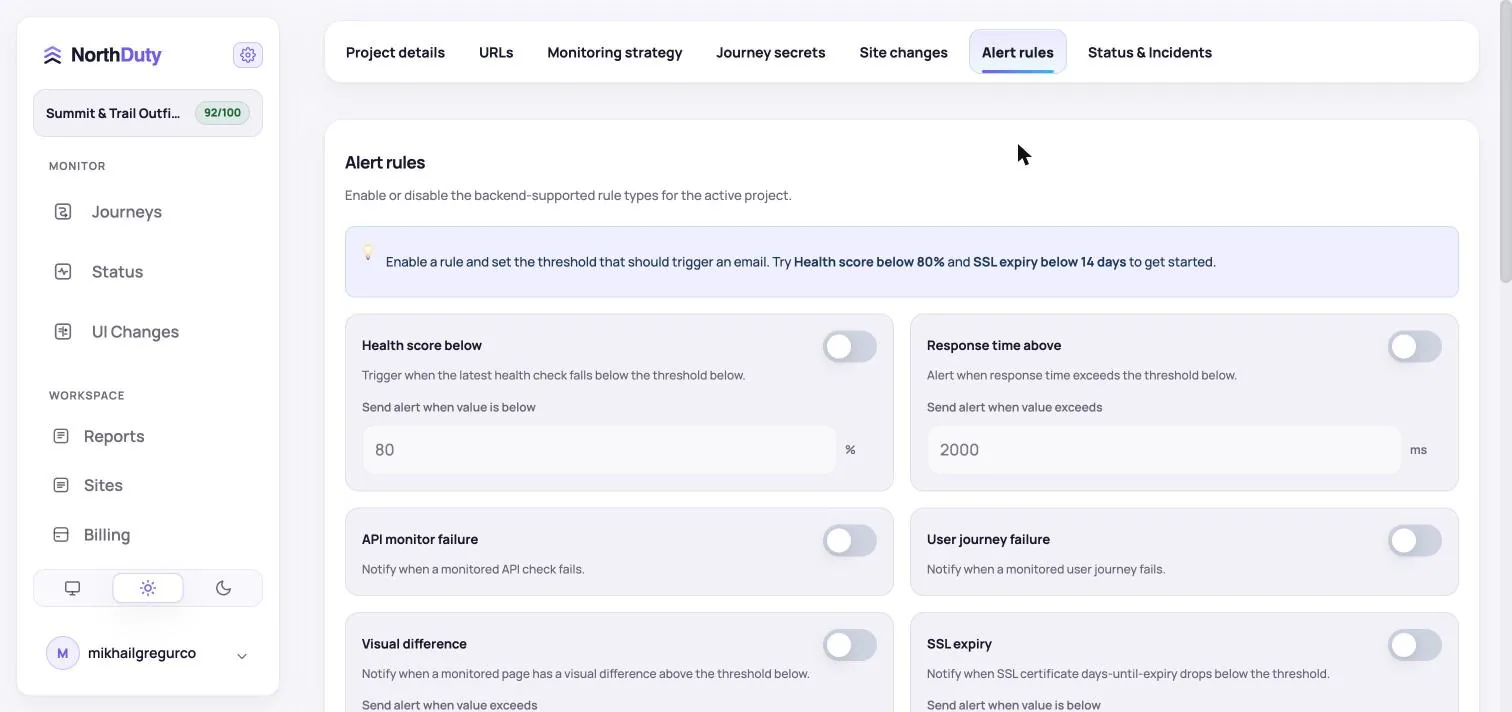
Every signal, routed to the right place
Monitoring only helps if the right people hear about a problem quickly. NorthDuty connects each project to the notification channels your team uses, so health, journey, and visual-change signals reach the inbox, chat channel, or phone that gets seen.
Slack, Microsoft Teams, Discord, Google Chat, and custom webhooks are delivered as an HTTP POST to a per-channel webhook URL, so they fit existing channel and automation setups. Telegram delivers through a bot, and SMS and WhatsApp are delivered via Twilio.
Why flexible alert routing matters
Different signals deserve different urgency and different channels.
- Reach the team where they already work — chat, email, or phone
- Route urgent signals to SMS or WhatsApp and routine ones to chat or email
- Drive on-call tooling and automations with custom webhooks
- Control noise with threshold-based alert rules per signal
- Use the same rules across health, journey, and visual-change signals
How to set up integrations
Connect a channel, then point alert rules at it.
1
Add a notification channel
Choose a channel type and provide its destination — a webhook URL for the webhook family, or the details needed for email, Telegram, SMS, or WhatsApp.
2
Define alert rules
Set thresholds for health score, response time, journey failures, and SSL expiry.
3
Route rules to channels
Send each rule to the channels that fit its urgency.
4
Tune over time
Adjust thresholds and routing as you learn which signals matter most.
Related NorthDuty Pages
Explore pricing, feature details, solution pages, and related tools connected to this website monitoring use case.
Pricing
Pricing
NorthDuty plans are sized by how many checkout, signup and login journeys you monitor: Free, $29 Starter, $79 Pro, $199 Business. 7-day trial, no card.
Compare pricing plansHub
Features
Explore NorthDuty features: coverage-aware AI journeys, a cross-site workspace overview, website health checks, and connected incident response.
Browse FeaturesHub
Solutions
Explore NorthDuty solutions for ecommerce website monitoring, SaaS website monitoring, agency website monitoring, and startup website monitoring.
Browse SolutionsFeature
Zapier Integration
Connect NorthDuty alerts to Zapier in about two minutes with a webhook: log incidents to Google Sheets, open Jira or Trello tickets, trigger 8,000+ apps.
Explore Zapier IntegrationFeature
Make Integration
Send NorthDuty alerts into Make scenarios with one webhook URL: route incidents, build client reports, connect 2,000+ apps. Works on Make's free plan.
Explore Make IntegrationFeature
n8n Integration
Trigger n8n workflows from NorthDuty alerts with a webhook node: self-hosted or cloud, full alert JSON, no code. Built for agencies running their own stack.
Explore n8n IntegrationFeature
Alerting
Send NorthDuty alerts to email, Slack, Teams, Discord, Google Chat, webhooks, Telegram, WhatsApp, and SMS.
Explore AlertingFrequently Asked Questions
Answers to common questions about this monitoring feature and when teams should use it.
Which alert channels does NorthDuty support?
Nine channel types: email, Slack, Microsoft Teams, Discord, Google Chat, custom webhooks, Telegram, SMS, and WhatsApp.
Are all channels available on every plan?
Email alerts are available on every plan, including Free. The other eight channels — Slack, Microsoft Teams, Discord, Google Chat, custom webhooks, Telegram, SMS, and WhatsApp — are available on any paid plan.
How are Slack and Teams alerts delivered?
Slack, Microsoft Teams, Discord, Google Chat, and custom webhooks are all delivered as an HTTP POST to a per-channel webhook URL you configure.
Can I send alerts by SMS or WhatsApp?
Yes. SMS and WhatsApp are delivered via Twilio, and Telegram is delivered through a bot.
Can I control which signals trigger alerts?
Yes. Alert rules let you set thresholds for health score, response time, failed journeys, and SSL expiry before anything is sent.
Can NorthDuty connect to Zapier, Make, or n8n?
Yes. The custom webhook channel posts structured alert JSON to any URL, so a Zapier Catch Hook, a Make custom webhook, or an n8n Webhook node can trigger automations from any alert. See the step-by-step Zapier, Make, and n8n guides.
Start monitoring your website with NorthDuty today.
Connect NorthDuty to the channels your team already uses and route every monitoring signal to the right place.
7 days with Pro features and limits, no credit card — then keep one daily journey on the free plan.