Alerts reach a channel you watch
Downtime notifications go to email and Slack so the right people see them within moments, not hours.
The point of monitoring is not the dashboard — it is the alert. Getting notified the moment your website goes down, through a channel you actually watch, is what turns monitoring into fewer minutes of downtime and less lost revenue.
Start your 7-day trial — no credit card, free plan after.
Be the first to know your site is down, in a channel your team actually watches.
The cost of downtime is really the cost of the gap between the failure and your response. If a site goes down at 2am and you find out at 9am, you have paid for seven hours of lost visitors, orders, and trust that a fast alert could have prevented. The technology to detect the outage is only useful if it reaches a human quickly.
Relying on customers to tell you is the worst case. By the time someone emails support or posts on social media, the problem has already affected many more people who simply left. Alerts exist so that you are the first to know, not the last.
The other failure mode is the opposite: alerts so noisy or unreliable that people stop trusting them. A single blip that fires a page at 3am, or a flood of duplicate notifications, trains a team to ignore the alerts entirely — which is just as dangerous as having none.
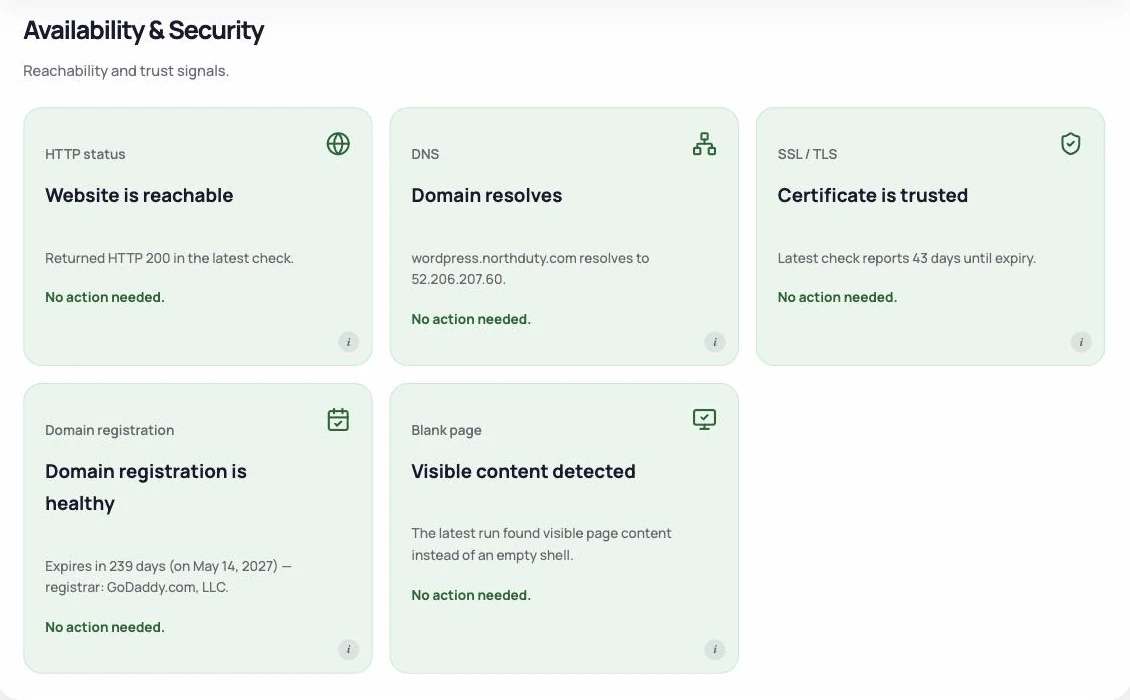
Good alerting starts with a check that runs often enough and is accurate enough to trust. NorthDuty checks your pages on a schedule and, because each check renders the page, it can alert not only when the site is fully down but also when a page loads blank, errors, or loses a critical element — the 'up but broken' failures a ping would miss.
When a check fails, NorthDuty sends the alert to the channels your team actually watches: email, Slack, and more. Routing alerts to a shared channel means the right people see it immediately, rather than a notification sitting unseen in one person's inbox.
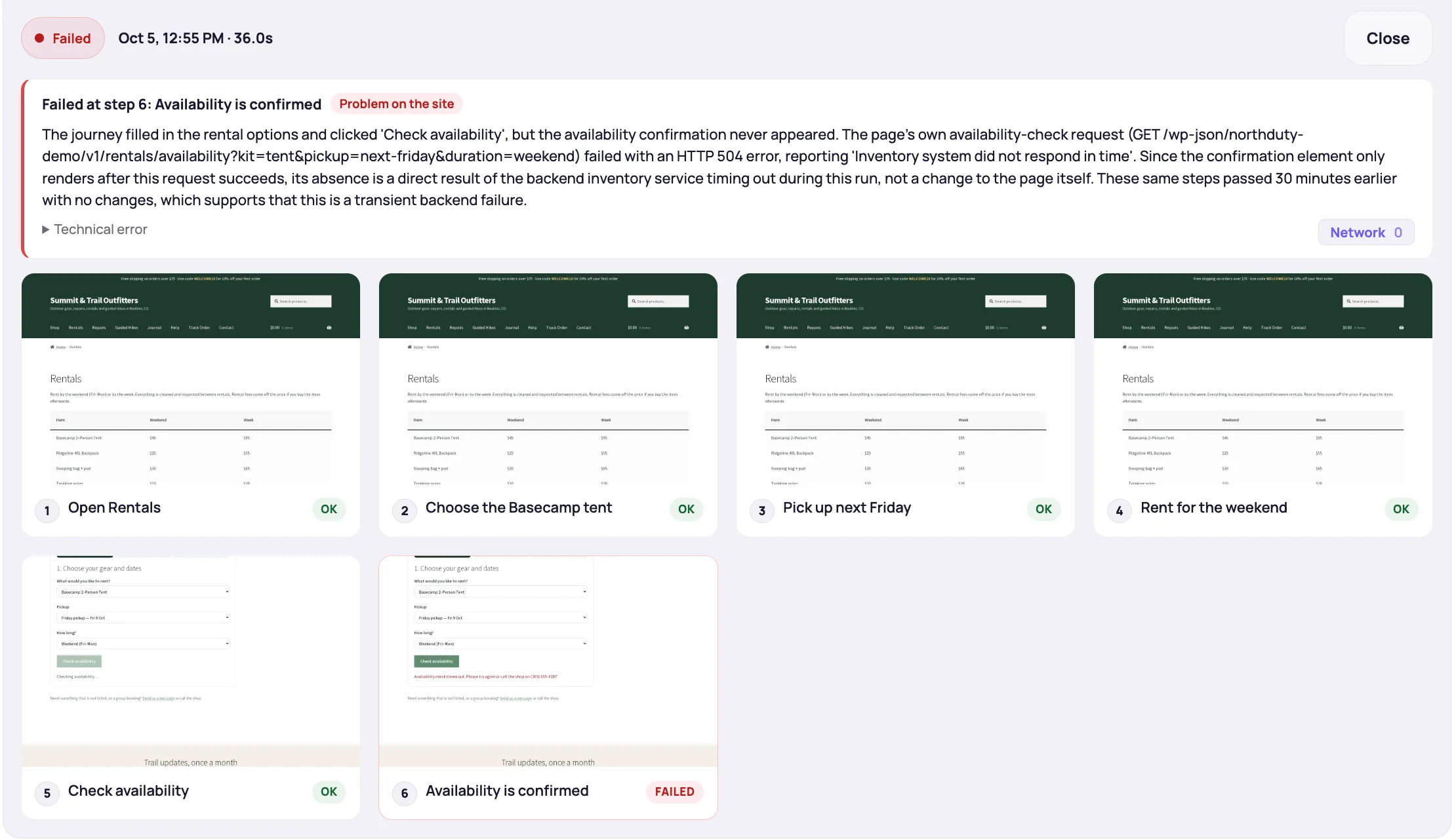
Alerts include the specific reason for the failure — a navigation error, an SSL problem, a blank page, a failed journey — so you can start fixing the actual issue instead of investigating from scratch. That context is the difference between a five-minute fix and an hour of guessing.
You can also give customers their own view with a public status page, so during an incident they see acknowledged, accurate information instead of flooding your support channel.
Reliable alerting is about speed, the right channel, and enough context to act.
Downtime notifications go to email and Slack so the right people see them within moments, not hours.
Because checks render the page, you are alerted to blank pages, script errors, and failed journeys — not only full outages.
The notification names the cause — SSL, DNS, navigation error, failed flow — so you can act immediately.
A public status page keeps visitors informed during an incident and reduces inbound support load.
A few choices make alerts fast, trustworthy, and actionable.
"The site is down" is the easiest alert to set up and rarely the most expensive failure. This is the order most businesses regret not having.
| Alert | Catches | Typical cost of missing it |
|---|---|---|
| Checkout or signup journey fails | A real purchase or registration cannot be completed | Revenue, per hour, with no visible symptom |
| Form submission fails | Leads stop arriving while the form still says thank you | Weeks of lost enquiries before anyone notices |
| Site down | Server or DNS failure | Obvious, and usually already monitored |
| SSL expiry approaching | A certificate about to lapse | A full-page browser warning for every visitor |
| Health score drops on a key page | A blank page, broken resources or a slow load after an update or a content edit | Conversion loss that looks like a bad week |
| JavaScript errors on a key page | A dead button or a half-loaded page | Silent, and usually reported by a customer |
| Page health drop | Blank pages, broken resources, failed API calls | Slow decline nobody attributes to a deploy |
Alerting on downtime is a solved problem: pick any monitoring tool, add a URL, choose a channel. If that is all you have, you are covered for the failure that announces itself and blind to the ones that do not.
The failures that cost money keep returning HTTP 200. A payment method removed by a plugin update, a form whose mail delivery stopped, a checkout step that throws a JavaScript error on mobile only — the server is healthy throughout, so no downtime alert ever fires. Catching those means running the flow itself on a schedule, which is what journey monitoring does.
Detecting downtime is only half the job; the alert is what makes it matter. Fast, accurate notifications through a channel your team watches turn monitoring into real reductions in downtime and lost revenue.
NorthDuty alerts you when a configured check detects a failure, with the result attached so your team can investigate. Email is included on Free; paid plans add Slack and other channels.
Keep exploring the feature pages and commercial routes connected to this topic.
Feature
Send NorthDuty alerts to email, Slack, Teams, Discord, Google Chat, webhooks, Telegram, WhatsApp, and SMS.
Explore AlertingFeature
Monitor uptime every 5 minutes by default with HTTP, SSL, DNS, blank-page detection, broken resources, JavaScript errors, and API call tracking.
Explore Uptime MonitoringFeature
Route NorthDuty alerts to the channels your team uses: email, Slack, Microsoft Teams, Discord, Google Chat, custom webhooks, Telegram, SMS, and WhatsApp.
Explore IntegrationsFeature
Publish a public status page, open detected findings as incidents, track alert-driven incidents automatically, and schedule maintenance windows.
Explore Status PagesTool
Free website response time checker. Enter a URL to see if the site is up, its HTTP status, and how fast it responds — with a fast, moderate, or slow rating.
Open Response Time CheckerPricing
NorthDuty plans are sized by how many checkout, signup and login journeys you monitor: Free, $29 Starter, $79 Pro, $199 Business. 7-day trial, no card.
Compare pricing plansMore NorthDuty guides on related website monitoring topics.
Article
How to set up a public status page for your website: what to include, how to manage incidents, and how to schedule maintenance so customers stay informed.
Read How to Set Up a Public Status PageArticle
How to monitor website uptime properly: check intervals, locations, false alarms — and the failures that return HTTP 200 so uptime checks never see them.
Read How to Monitor Website UptimeArticle
Learn why websites can break without going fully offline and how website health monitoring helps detect silent failures.
Read Why Websites Break Without Going OfflineShort answers that summarize the practical takeaways from this guide.
The flows that make money: checkout, signup, login and your main form, run as real-browser journeys. Then SSL expiry, JavaScript errors and page-health drops on key pages. All of those fail while the site returns HTTP 200, so no downtime alert will fire.
Use a monitoring tool that checks your site on a schedule and notifies you when a check fails. NorthDuty sends downtime alerts to email, Slack, and more, with the specific failure reason included.
It depends on your check frequency. NorthDuty checks as often as every minute on paid plans (every 5 minutes on the free plan), so alerts fire shortly after a failure occurs.
Yes. NorthDuty can send alerts to Slack and other channels in addition to email, so downtime reaches a place your team actively watches.
Choose a tool with accurate, rendered checks and clear failure reasons, route alerts to the right channel, and tune them over time. NorthDuty's checks and reason codes are designed to keep alerts trustworthy.
Set up scheduled checks and an alert destination. NorthDuty notifies your team when a configured check detects a failure, with the result attached.
7 days with Pro features and limits, no credit card — then keep one daily journey on the free plan.